

The flow of funds is chosen when you create the company (user funded or company balance). A company owner can switch models from the dashboard’s Company balance page, but only until the company first moves money (a card is funded, a transfer runs, or a deposit lands); after that the choice locks. Companies on the company balance model get the full test-mode loop immediately and free; live usage (the real pool, real transfers) requires an active paid subscription, the same one that unlocks production clients.
The flow of funds
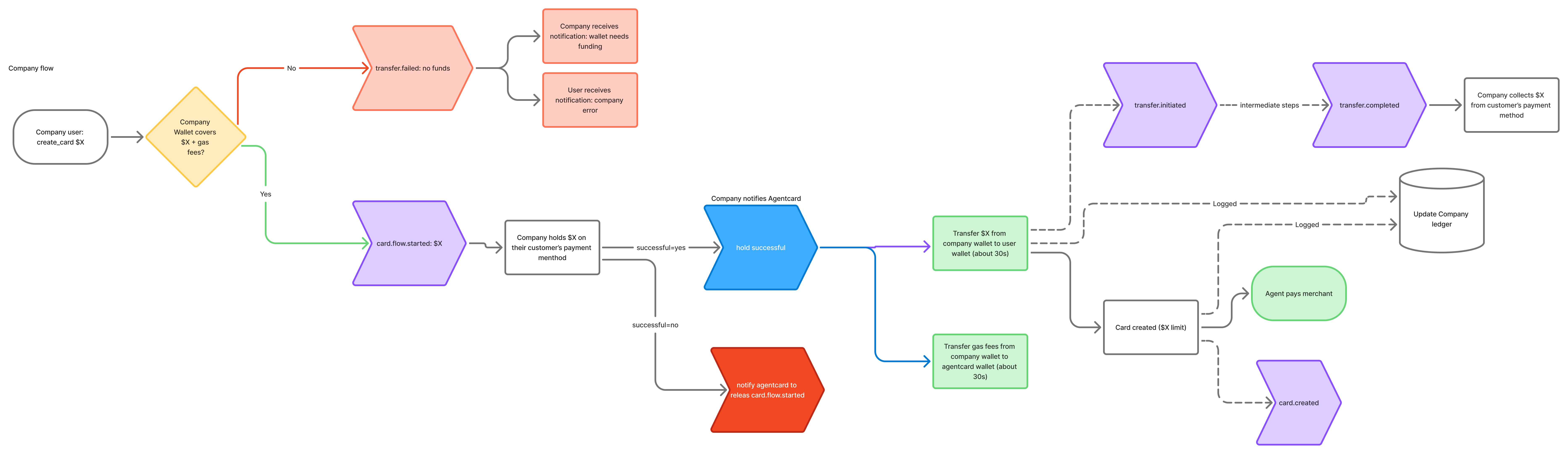
Company balance: from create_card to the agent paying the merchant
- A connected user’s agent calls
create_cardwith the company flow. Agentcard checks your pool covers the amount (plus fees) and reserves it. - You receive a
card_flow.startedwebhook. This is your moment to collect: place a hold on your customer’s payment method in your own billing system. - You report the outcome with the
confirm_collectiontool — outcomesucceeded, orfailedto release the reservation. - Agentcard transfers the amount from your balance into the user’s spending power (about 30 seconds on-chain) and emits
transfer.initiated, thentransfer.completed. - Capture your customer’s payment when you receive
transfer.completed. From this point the funding is final: even if the card mint failed afterward, the money stays as that user’s spending power and automatically offsets their next card (you would seecard_flow.failedwithfunds_status: released_to_headroom). - The card mints and
card.createdfires with thetransfer_id, then the agent pays the merchant as usual. - If the card closes with unused balance,
transfer.releasedfires so you can release or refund your own hold. The unused amount stays as that user’s spending power and reduces what your pool sends on their next card.
ack_mode: auto_approve (dashboard or CLI): step 2 still fires as a webhook, but the transfer proceeds without waiting.
Fund the balance
Set up the balance once (dashboard: Company balance → Set up balance, oragent-cards companies balance provision --org <org-id>). Then fund it two ways — both credit the same pool and fire the same wallet.funded webhook:
- Apple Pay / Google Pay (dashboard → Company balance → Add funds, admins only). A hosted card checkout — no crypto wallet needed. Any debit or credit card inside Apple/Google Pay works (a Mercury card, for example). First use verifies a US phone with a one-time code, and the payment provider may run a quick identity check on the payer the first time. 10,000 per transaction; no lifetime purchase caps. Agentcard covers the provider fee (up to a cap), so the full amount lands.
- USDC on Base — send to the pool’s deposit address. No caps; this is the rail for recurring, treasury-scale funding.
wallet.balance.low before a card creation ever fails for insufficient funds.
Creating the live pool and funding it both require the active subscription; without one these calls return 403 subscription_required (test credentials and the mock pool keep working). Subscribe from the dashboard’s Go live page.
The create_card protocol
The end user’s agent calls the samecreate_card it always has. Two additions:
- An optional
funds_source(onramp_floworcompany_flow). Most companies set their default funds source tocompany_flowso agents never pass it. - While funding is in flight,
create_cardreturns202 { "status": "funding_in_progress", "transferId": "owt_…", "retry_after_seconds": 10 }. The agent retries with the same arguments and attaches to the in-flight funding, returning the card when it is ready. A retry that lands after the mint still returns that card (for about 2 minutes, while it is unused) instead of opening a second funding. Declined or timed-out collections surface as422 funding_not_approved.
create_card itself with funds_source: "company_flow". Your own call counts as the collection confirmation, and passing an idempotency_key makes retries attach instead of double-funding. Reusing a key with a different amount or cardholder is rejected with 409 idempotency_key_reuse; use a fresh key for each new request.
Balance tools
Available with your company credentials:
Transfers move through public states
pending (substates: awaiting_collection, collection_confirmed, transferring), funded, consumed, reclaimed, and failed (with a failure_reason).
Try it in test mode
The whole loop runs in test mode with no real money: fund the mock pool from the dashboard’s Company balance page (test mode), then runcreate_card with a test credential. The same webhooks fire with livemode: false, the transfer simulates in about 2 seconds, and the card is a mock. Integrate the webhook and collection confirmation exactly as you would in production.