> ## Documentation Index
> Fetch the complete documentation index at: https://docs.agentcard.sh/llms.txt
> Use this file to discover all available pages before exploring further.
# Complete a purchase on a Shopify store with Kernel
> Learn how an agent in a Kernel browser buys from a Shopify store and pays with the user's Vault card, from the product page to the merchant's confirmation number.
This guide runs one real purchase end to end: an agent in a [Kernel](https://kernel.sh) browser puts a \$0.99 PDF from a Shopify store in the cart, reaches the checkout, and pays with a card the user stored in the Vault. The user approves on their phone with Face ID, Shopify's thank-you page shows the confirmation number, and the browser is deleted. Every screenshot and every line of output below comes from that run.
[Kernel](/vault/integrations/agent-browsers/kernel) covers the two ways to connect a Kernel browser to the Vault and the code that creates the browser and attaches the SDK. This guide does not repeat it. It takes the SDK path and shows everything around that snippet: the shopping leg a Shopify store needs, what to pass when you attach, what the SDK reports while the user decides, how to read Shopify's confirmation number, and how to leave nothing running.
What you end up with: a script you run once with a handful of environment variables that prints `completed order #5CQFGUXJX`, and a session you can watch live in Kernel's dashboard while it happens.
## Before you start
A real purchase needs production credentials. The sandbox recognises the card request and pauses it, but no approval link is sent and nothing is charged. Run the sandbox first to see the pause, then switch the credentials.
* The Kernel setup from [Kernel](/vault/integrations/agent-browsers/kernel): a Kernel API key, and `@onkernel/sdk`, `@agent-cards/sdk` and `playwright-core` installed. `@agent-cards/sdk` is the SDK's current name; `@agent-cards/checkout` still installs and re-exports it.
* An Agentcard organization with production credentials (`client_id` and `client_secret`), and a user of that organization with a card in the Vault. [Adding a card](/vault/adding-a-card) gets you both; the user's `user_id` is what you pass to the SDK.
* A Shopify store with guest checkout and something cheap. The run below uses [The Good and the Beautiful](https://www.goodandbeautiful.com), a homeschool publisher, and its \$0.99 High School Biology Answer Key (PDF): a digital product, so nothing ships and the checkout asks for an email and a billing address only.
* The user's phone within reach. The approval link is theirs to open.
## Tools
## How it works
| Moment | Who acts | What happens |
| - | - | - |
| Shop | Your agent, in the Kernel browser | Product page, cart, checkout. Shopify's checkout is one page: contact, payment method, billing address, card. |
| Attach | Your code | `attachToPlaywright` arms the page before the card form is touched. The SDK syncs the processors it recognises; Shopify's card session request is one of them. |
| Pay | Your agent | Types a placeholder card into Shopify's card fields and clicks Pay now once. |
| Pause | The SDK | Shopify sends the card to `checkout.pci.shopifyinc.com`. The SDK holds that request and hands you an approval link. |
| Approve | The user, on their phone | Opens the link, sees the merchant and the amount, approves with Face ID. Their device sends the real card. |
| Confirm | Your code | The page continues to the thank-you page. You read the confirmation number, report it, and delete the browser. |
## 1. Open the checkout
Kernel gives you a Chromium with a CDP address; Playwright drives it like a local browser. Two things matter before the agent types anything. Create the context with service workers blocked, because a service worker owns requests Playwright cannot see, and the card request is one of them. And dismiss the store's cookie notice yourself, because it sits over the checkout button.
```ts theme={null}
const context = await browser.newContext({ serviceWorkers: 'block' });
const page = await context.newPage();
await page.goto('https://www.goodandbeautiful.com/products/high-school-biology-answer-key');
await page.locator('form[action="/cart/add"] button[type=submit]').first().click();
await page.goto('https://www.goodandbeautiful.com/cart');
const cookie = page.locator('button:has-text("Decline"), button:has-text("Accept")').first();
if (await cookie.isVisible()) await cookie.click();
await page.getByRole('button', { name: /check ?out/i }).filter({ visible: true }).first().click();
await page.waitForURL(/\/checkouts\//);
```
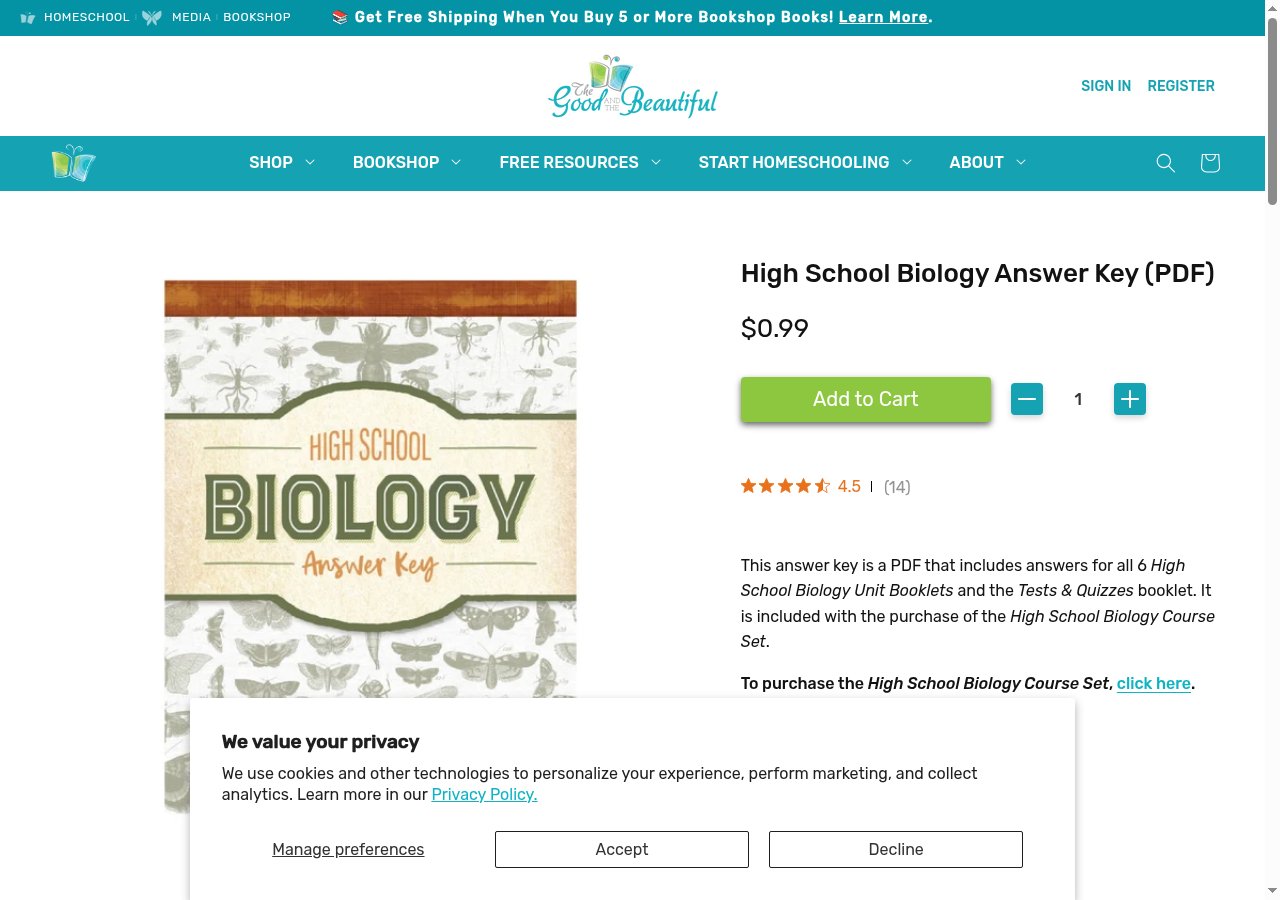
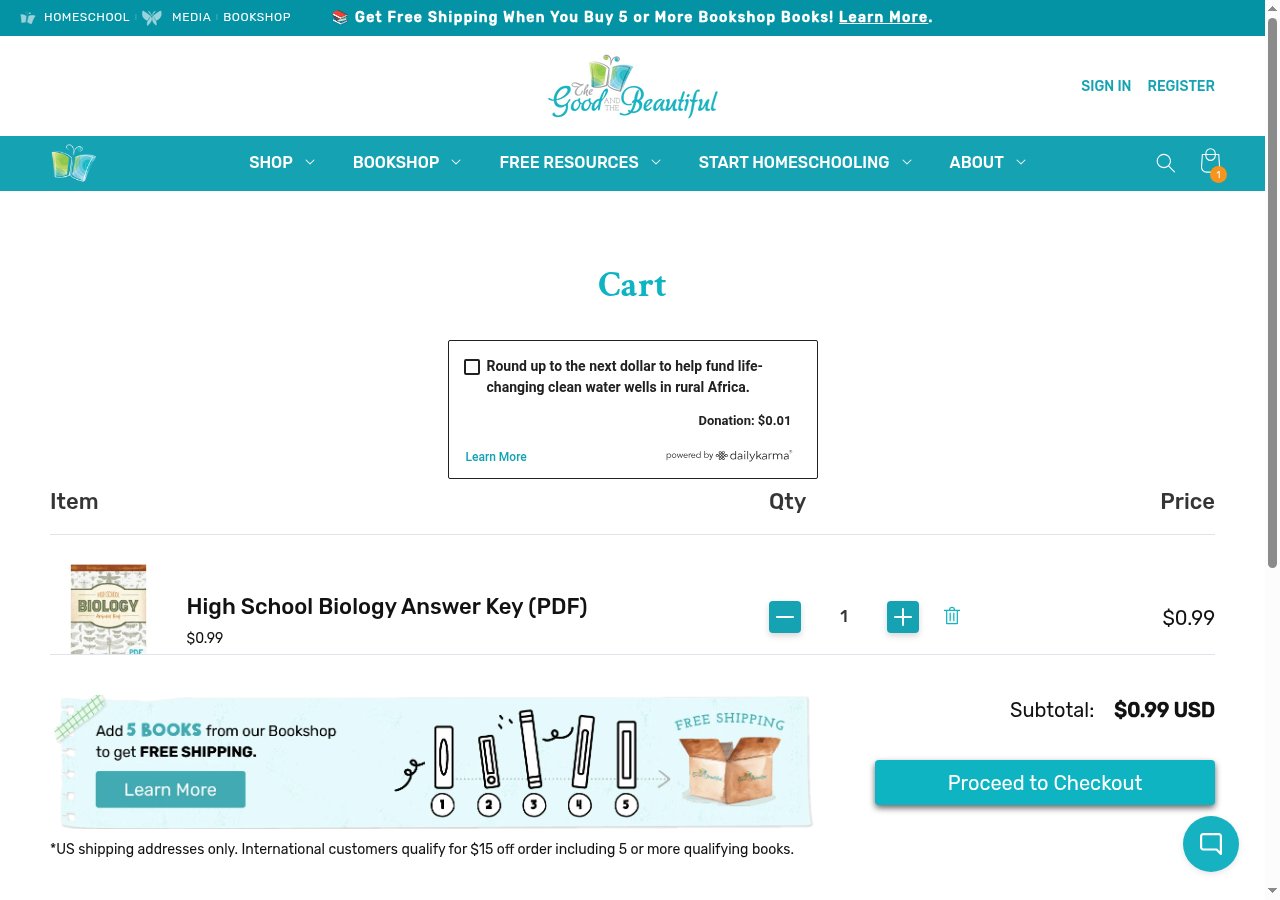 Shopify's checkout URL is `/checkouts/cn//en-us`. A store with Shop Pay sends the cart permalink to `shop.app` first; the cart page's own checkout button lands on the store's checkout, which is where the SDK works.
## 2. Fill the checkout and read the total
The checkout is one page. Fill the contact email, choose the credit card payment method, and fill the billing address. Shopify recomputes tax for the address, so read the total after the address settles, not before: the estimate before the address said \$1.06, and California charges no tax on a digital product, so the total the user approved was \$0.99. The amount you pass is the amount the approval shows the user. Shopify's card request carries no total of its own for the SDK to compare it against, so wait until the order summary has stopped changing before you read it, and read it again right before Pay now if anything on the page changed.
```ts theme={null}
await page.fill('#email', buyer.email);
await page.locator('#basic-creditCards').check({ force: true });
const field = (name) => page.locator(`[name=${name}]:visible`).first();
await field('countryCode').selectOption({ label: 'United States' });
await field('firstName').fill(buyer.first);
await field('lastName').fill(buyer.last);
await field('address1').fill(buyer.address1);
await field('city').fill(buyer.city);
await field('zone').selectOption({ label: 'California' });
await field('postalCode').fill(buyer.zip);
await page.keyboard.press('Tab');
await page.waitForLoadState('networkidle');
const readTotal = async () => {
const m = (await page.locator('body').innerText()).match(/Total\s*USD\s*\$([0-9]+\.[0-9]{2})/);
return m ? Math.round(parseFloat(m[1]) * 100) : null;
};
let totalCents = await readTotal();
for (let i = 0; i < 5; i++) { // settle: two identical reads, two seconds apart
await page.waitForTimeout(2000);
const again = await readTotal();
if (again === totalCents) break;
totalCents = again;
}
if (totalCents == null) {
// No total, no purchase: nothing is attached yet, so the session can go.
await browser.close();
await kernel.browsers.deleteByID(session.session_id);
throw new Error('the checkout shows no total; stopped before attaching');
}
```
Shopify's checkout URL is `/checkouts/cn//en-us`. A store with Shop Pay sends the cart permalink to `shop.app` first; the cart page's own checkout button lands on the store's checkout, which is where the SDK works.
## 2. Fill the checkout and read the total
The checkout is one page. Fill the contact email, choose the credit card payment method, and fill the billing address. Shopify recomputes tax for the address, so read the total after the address settles, not before: the estimate before the address said \$1.06, and California charges no tax on a digital product, so the total the user approved was \$0.99. The amount you pass is the amount the approval shows the user. Shopify's card request carries no total of its own for the SDK to compare it against, so wait until the order summary has stopped changing before you read it, and read it again right before Pay now if anything on the page changed.
```ts theme={null}
await page.fill('#email', buyer.email);
await page.locator('#basic-creditCards').check({ force: true });
const field = (name) => page.locator(`[name=${name}]:visible`).first();
await field('countryCode').selectOption({ label: 'United States' });
await field('firstName').fill(buyer.first);
await field('lastName').fill(buyer.last);
await field('address1').fill(buyer.address1);
await field('city').fill(buyer.city);
await field('zone').selectOption({ label: 'California' });
await field('postalCode').fill(buyer.zip);
await page.keyboard.press('Tab');
await page.waitForLoadState('networkidle');
const readTotal = async () => {
const m = (await page.locator('body').innerText()).match(/Total\s*USD\s*\$([0-9]+\.[0-9]{2})/);
return m ? Math.round(parseFloat(m[1]) * 100) : null;
};
let totalCents = await readTotal();
for (let i = 0; i < 5; i++) { // settle: two identical reads, two seconds apart
await page.waitForTimeout(2000);
const again = await readTotal();
if (again === totalCents) break;
totalCents = again;
}
if (totalCents == null) {
// No total, no purchase: nothing is attached yet, so the session can go.
await browser.close();
await kernel.browsers.deleteByID(session.session_id);
throw new Error('the checkout shows no total; stopped before attaching');
}
```
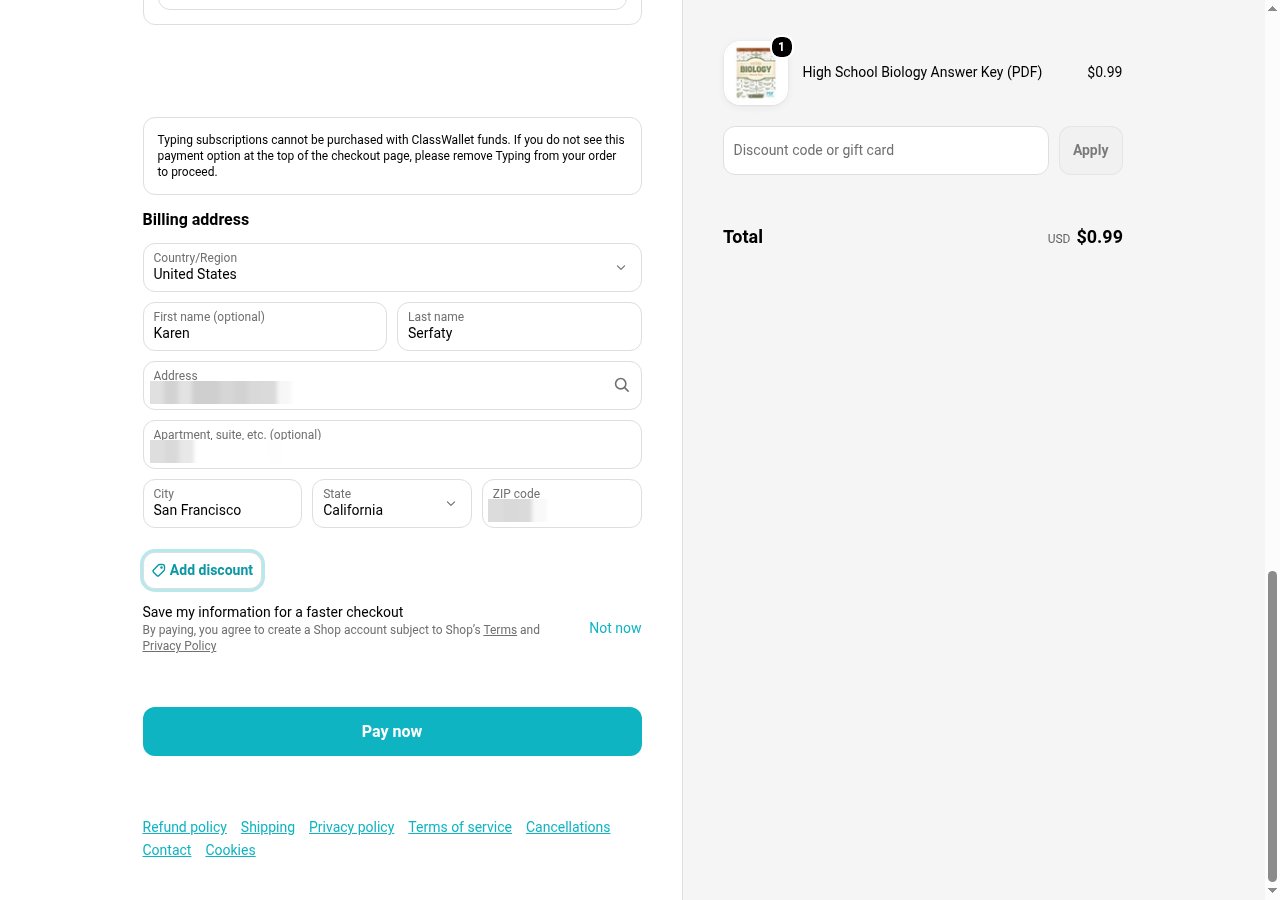 Use an email with no Shop Pay account for the buyer. Shopify recognises an email that has one and opens a "Confirm it's you" code prompt over the page; the agent cannot answer it, and it covers Pay now.
## 3. Attach before the card form
Attach once the billing address is in and before anything touches the card fields. The call is the one on the [Kernel](/vault/integrations/agent-browsers/kernel) page, with the parts a real purchase needs: the total you just read, the time the user gets, and a merchant result reader.
```ts theme={null}
import { VaultClient, attachToPlaywright } from '@agent-cards/sdk';
const vault = new VaultClient({
clientId: process.env.AGENTCARD_CLIENT_ID,
clientSecret: process.env.AGENTCARD_CLIENT_SECRET,
});
await vault.syncRegistry();
let payClickedAt = null;
const checkout = await attachToPlaywright(page, {
vault,
user: process.env.AGENTCARD_USER_ID,
merchant: 'www.goodandbeautiful.com',
amount: totalCents,
currency: 'usd',
timeoutMs: 15 * 60 * 1000,
payClickedAt: () => payClickedAt,
onApprovalUrl: (url) => sendToUser(url),
onStateChange: (state) => console.log(state.status, state.reason ?? ''),
resolveMerchantResult: async () => {
const body = await page.locator('body').innerText();
const order = body.match(/Confirmation\s*#\s*([A-Z0-9]+)/i);
if (order && /You.ve paid for your order/.test(body)) return { status: 'completed', orderId: order[1] };
if (/There was a problem|declined|could not be processed/i.test(body)) return { status: 'failed' };
return { status: 'pending' }; // a thank-you URL without the number is not a receipt yet
},
});
```
`sendToUser` is yours: a text, a push, a message in the thread your product already has with the user. The link is a bearer link. Never hand it to the agent or log it where the agent reads.
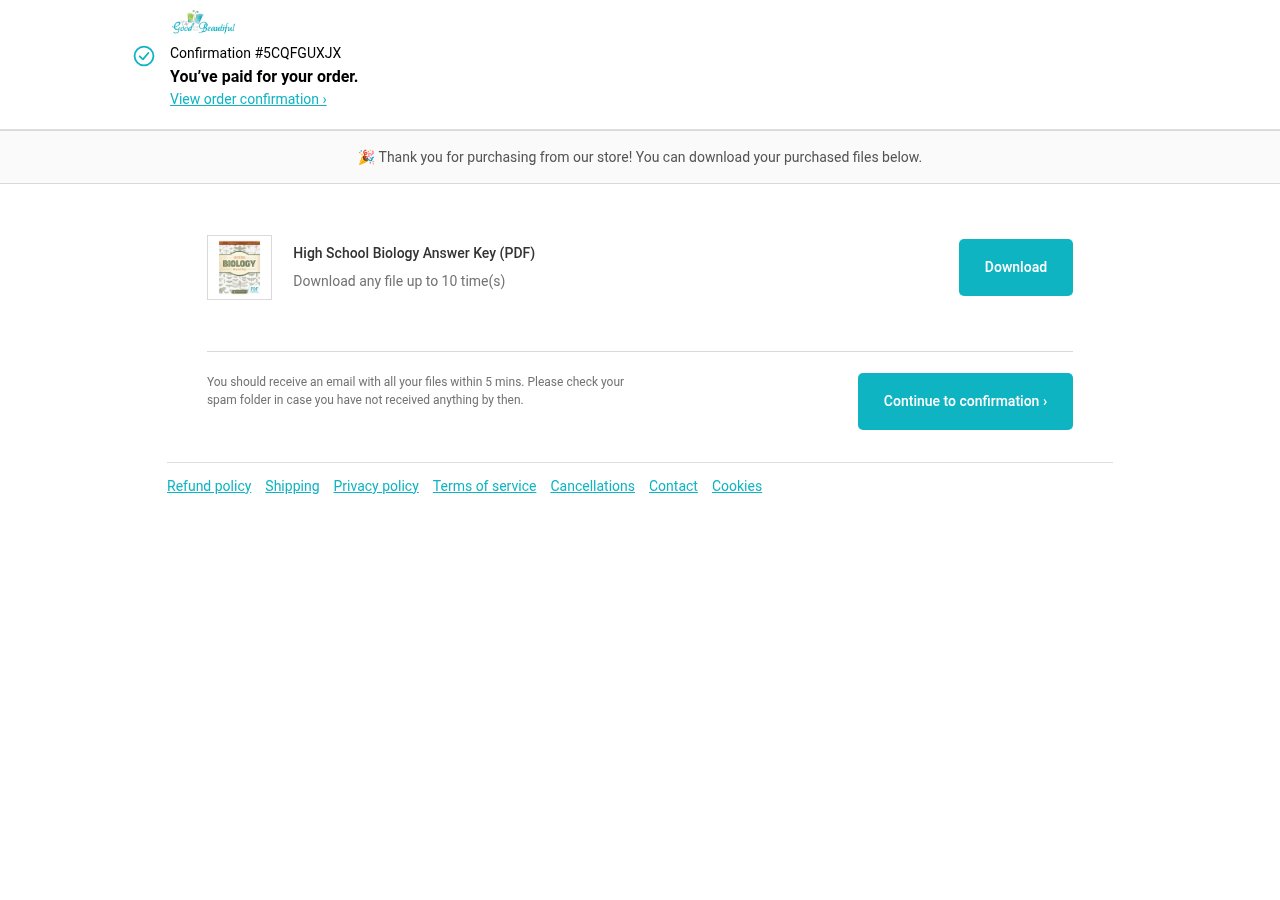
`resolveMerchantResult` reads the merchant's answer, not the processor's. Shopify's thank-you page says `Confirmation #` and the number, then "You've paid for your order." The resolver reports `completed` only with that number in hand; the thank-you URL alone, or the page before the number paints, is `pending`. The SDK never clicks Pay for you, and neither should a retry of yours.
Leave `requireMerchantResult` off for a Shopify checkout. That option holds every further card request until you reconcile, and Shopify sends more of them right after the real card goes through; with the hold on, the SDK blocked eleven of them in two seconds and the page sat on "Processing…" until the browser was deleted. Nothing was charged, and nothing was bought either.
## 4. Pay with a placeholder card
Shopify renders each card field in its own iframe on `checkout.pci.shopifyinc.com`. The iframes are named `card-fields-number-…`, `card-fields-expiry-…`, `card-fields-verification_value-…` and `card-fields-name-…`; the suffix changes per page load, so match on the prefix. Each iframe holds a hidden honeypot input ahead of the real field; take the visible one, or the number lands in a field Shopify ignores. Type any of [Stripe's published test cards](https://docs.stripe.com/testing); the docs keep the number out of the page and the script reads it from `PLACEHOLDER_CARD_NUMBER`. The real card never enters the browser.
```ts theme={null}
const card = (prefix) =>
page.frameLocator(`iframe[name^="card-fields-${prefix}-"]`)
.locator('input:not([data-honeypot-field])').filter({ visible: true }).first();
const placeholder = { number: process.env.PLACEHOLDER_CARD_NUMBER, expiry: '1234', cvc: '123' };
await card('number').pressSequentially(placeholder.number);
await card('expiry').pressSequentially(placeholder.expiry);
await card('verification_value').pressSequentially(placeholder.cvc);
await card('name').pressSequentially(`${buyer.first} ${buyer.last}`);
payClickedAt = Date.now();
await page.locator('#checkout-pay-button').click();
```
Use an email with no Shop Pay account for the buyer. Shopify recognises an email that has one and opens a "Confirm it's you" code prompt over the page; the agent cannot answer it, and it covers Pay now.
## 3. Attach before the card form
Attach once the billing address is in and before anything touches the card fields. The call is the one on the [Kernel](/vault/integrations/agent-browsers/kernel) page, with the parts a real purchase needs: the total you just read, the time the user gets, and a merchant result reader.
```ts theme={null}
import { VaultClient, attachToPlaywright } from '@agent-cards/sdk';
const vault = new VaultClient({
clientId: process.env.AGENTCARD_CLIENT_ID,
clientSecret: process.env.AGENTCARD_CLIENT_SECRET,
});
await vault.syncRegistry();
let payClickedAt = null;
const checkout = await attachToPlaywright(page, {
vault,
user: process.env.AGENTCARD_USER_ID,
merchant: 'www.goodandbeautiful.com',
amount: totalCents,
currency: 'usd',
timeoutMs: 15 * 60 * 1000,
payClickedAt: () => payClickedAt,
onApprovalUrl: (url) => sendToUser(url),
onStateChange: (state) => console.log(state.status, state.reason ?? ''),
resolveMerchantResult: async () => {
const body = await page.locator('body').innerText();
const order = body.match(/Confirmation\s*#\s*([A-Z0-9]+)/i);
if (order && /You.ve paid for your order/.test(body)) return { status: 'completed', orderId: order[1] };
if (/There was a problem|declined|could not be processed/i.test(body)) return { status: 'failed' };
return { status: 'pending' }; // a thank-you URL without the number is not a receipt yet
},
});
```
`sendToUser` is yours: a text, a push, a message in the thread your product already has with the user. The link is a bearer link. Never hand it to the agent or log it where the agent reads.
`resolveMerchantResult` reads the merchant's answer, not the processor's. Shopify's thank-you page says `Confirmation #` and the number, then "You've paid for your order." The resolver reports `completed` only with that number in hand; the thank-you URL alone, or the page before the number paints, is `pending`. The SDK never clicks Pay for you, and neither should a retry of yours.
Leave `requireMerchantResult` off for a Shopify checkout. That option holds every further card request until you reconcile, and Shopify sends more of them right after the real card goes through; with the hold on, the SDK blocked eleven of them in two seconds and the page sat on "Processing…" until the browser was deleted. Nothing was charged, and nothing was bought either.
## 4. Pay with a placeholder card
Shopify renders each card field in its own iframe on `checkout.pci.shopifyinc.com`. The iframes are named `card-fields-number-…`, `card-fields-expiry-…`, `card-fields-verification_value-…` and `card-fields-name-…`; the suffix changes per page load, so match on the prefix. Each iframe holds a hidden honeypot input ahead of the real field; take the visible one, or the number lands in a field Shopify ignores. Type any of [Stripe's published test cards](https://docs.stripe.com/testing); the docs keep the number out of the page and the script reads it from `PLACEHOLDER_CARD_NUMBER`. The real card never enters the browser.
```ts theme={null}
const card = (prefix) =>
page.frameLocator(`iframe[name^="card-fields-${prefix}-"]`)
.locator('input:not([data-honeypot-field])').filter({ visible: true }).first();
const placeholder = { number: process.env.PLACEHOLDER_CARD_NUMBER, expiry: '1234', cvc: '123' };
await card('number').pressSequentially(placeholder.number);
await card('expiry').pressSequentially(placeholder.expiry);
await card('verification_value').pressSequentially(placeholder.cvc);
await card('name').pressSequentially(`${buyer.first} ${buyer.last}`);
payClickedAt = Date.now();
await page.locator('#checkout-pay-button').click();
```
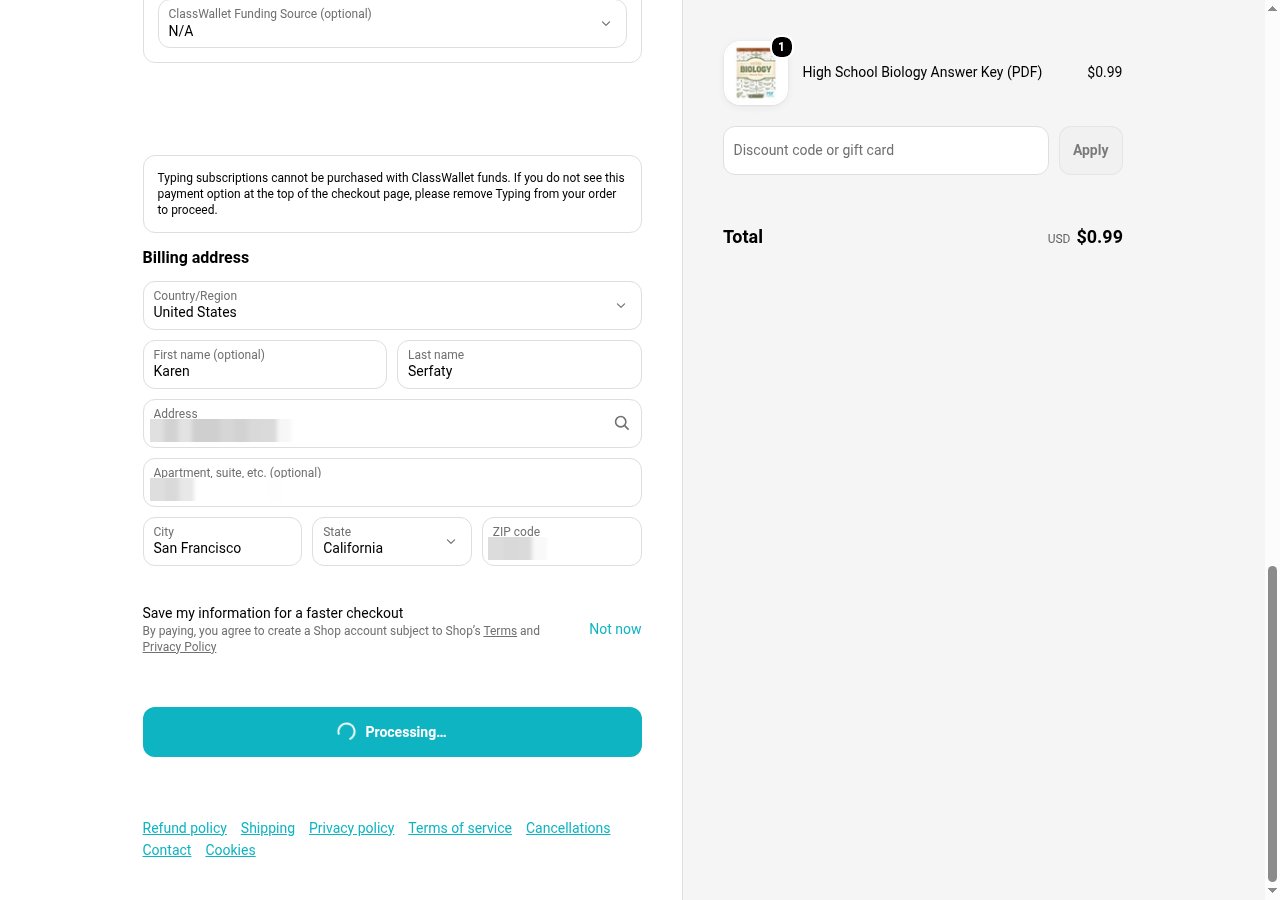
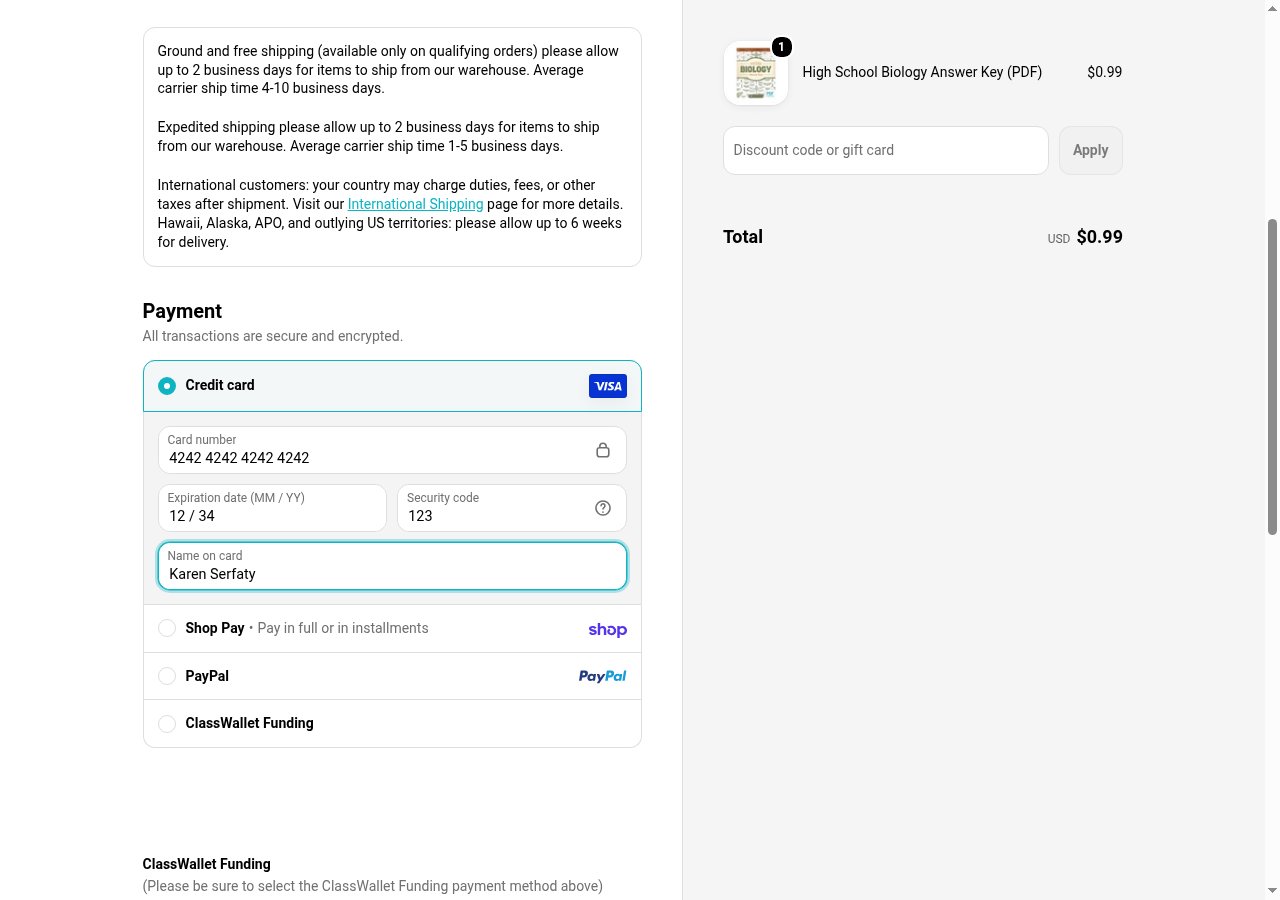 Click Pay now once. Shopify posts the card to `checkout.pci.shopifyinc.com/sessions`, the SDK pauses that request, and `onApprovalUrl` fires with the link. The button reads "Processing…" and stays that way until the user decides; they have 15 minutes.
 ## 5. Watch the approval
`onStateChange` and `onEvent` are how your code follows along. This is what the run printed, from the click to the merchant's answer:
```text theme={null}
03:30:28 event card_request_paused {"url":"https://checkout.pci.shopifyinc.com/sessions","recognizer":"shopify"}
03:30:28 state=awaiting_approval
03:30:28 Pay now clicked
03:30:29 state=awaiting_approval auth=cauth_70935e6a0f0dfa0e4d6536d5
03:30:29 APPROVAL LINK https://vault.agentcard.sh/authorize?id=cauth_70935e6a0f0dfa0e4d6536d5
03:30:47 event authorized {"mode":"token","authorizationId":"cauth_70935e6a0f0dfa0e4d6536d5"}
03:30:47 state=awaiting_merchant auth=cauth_70935e6a0f0dfa0e4d6536d5
03:33:34 state=completed auth=cauth_70935e6a0f0dfa0e4d6536d5
```
The user sees the merchant and the amount on the approval page and confirms with Face ID. Their device sends the real card to Shopify's card session endpoint and reports the response; the SDK replays it into the paused request, and the checkout continues as if the browser had sent the real card. Eighteen seconds passed between the click and the approval here; the three minutes after it were Shopify finishing the order.
## 5. Watch the approval
`onStateChange` and `onEvent` are how your code follows along. This is what the run printed, from the click to the merchant's answer:
```text theme={null}
03:30:28 event card_request_paused {"url":"https://checkout.pci.shopifyinc.com/sessions","recognizer":"shopify"}
03:30:28 state=awaiting_approval
03:30:28 Pay now clicked
03:30:29 state=awaiting_approval auth=cauth_70935e6a0f0dfa0e4d6536d5
03:30:29 APPROVAL LINK https://vault.agentcard.sh/authorize?id=cauth_70935e6a0f0dfa0e4d6536d5
03:30:47 event authorized {"mode":"token","authorizationId":"cauth_70935e6a0f0dfa0e4d6536d5"}
03:30:47 state=awaiting_merchant auth=cauth_70935e6a0f0dfa0e4d6536d5
03:33:34 state=completed auth=cauth_70935e6a0f0dfa0e4d6536d5
```
The user sees the merchant and the amount on the approval page and confirms with Face ID. Their device sends the real card to Shopify's card session endpoint and reports the response; the SDK replays it into the paused request, and the checkout continues as if the browser had sent the real card. Eighteen seconds passed between the click and the approval here; the three minutes after it were Shopify finishing the order.
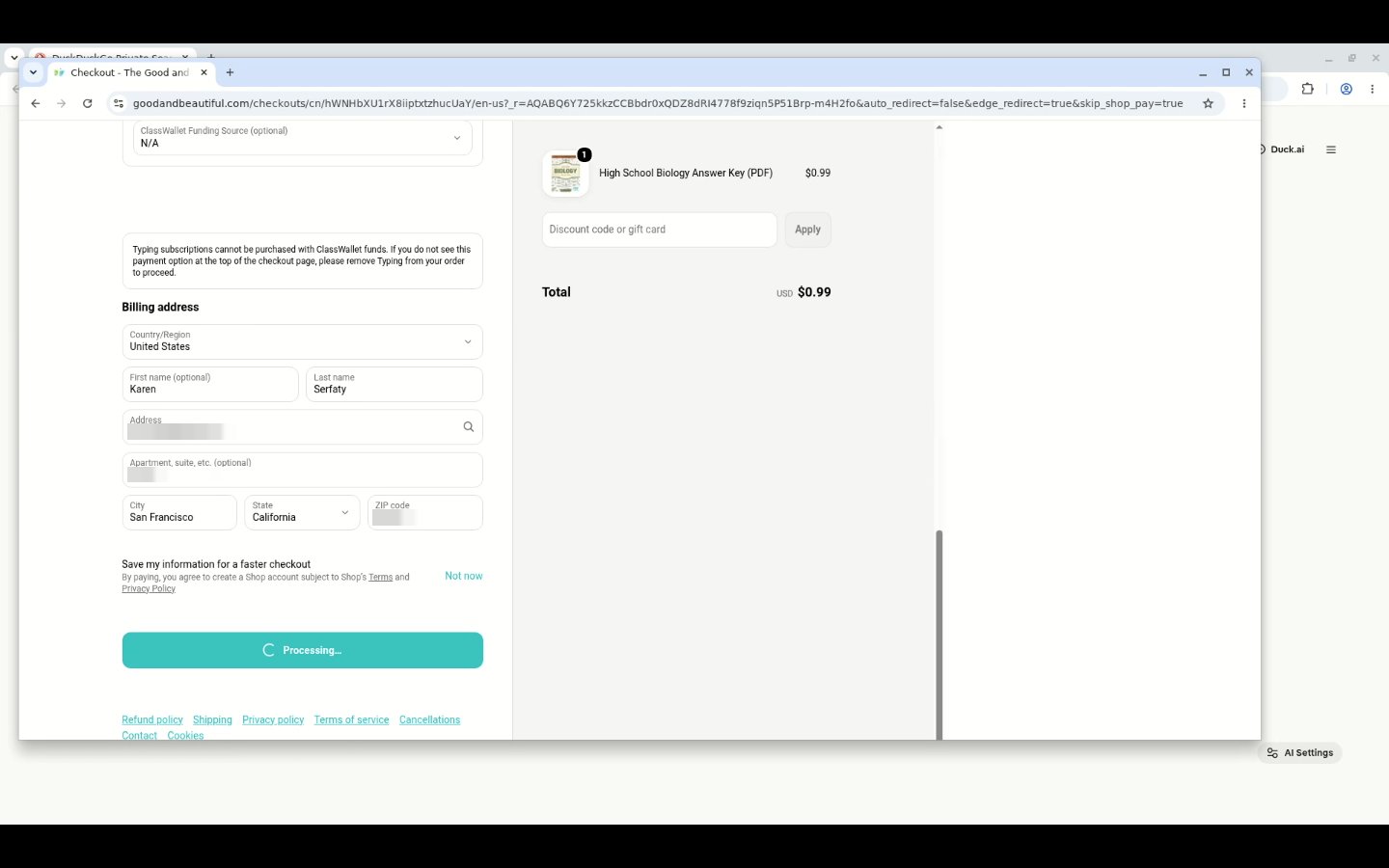 Kernel's `browser_live_view_url` opens the session in a tab. During the pause it shows the checkout exactly as the agent left it, which is what you show a user who asks what their agent is doing.
The approval page is bound to the user the purchase was made for. If the user's phone is signed in to the Vault as a different account, the page says "That approval link is not valid for your account." The user signs out there, opens a Vault link your code made for their `user_id`, adds the card, and the approval link works.
## 6. Read the confirmation number and delete the browser
Once the state turns to `awaiting_merchant`, wait for the thank-you page and reconcile. Delete the Kernel session only when the result is `completed`, `failed` or `declined`. A `pending` or `outcome_unknown` result means the merchant has not answered yet, and the page is the only place to read that answer from, so the session stays up (it ends on its own at `timeout_seconds` of inactivity) and you reconcile again before you decide anything.
```ts theme={null}
await page.waitForURL(/\/post-purchase|\/thank[_-]?you/, { timeout: 180_000 }).catch(() => {});
let result = await checkout.reconcile();
for (let i = 0; i < 10 && !['completed', 'failed', 'declined'].includes(result.status); i++) {
await page.waitForTimeout(15_000);
result = await checkout.reconcile();
}
console.log(result.status, result.orderId ?? '', result.authorizationId ?? '');
if (['completed', 'failed', 'declined'].includes(result.status)) {
await browser.close();
await kernel.browsers.deleteByID(session.session_id);
} else {
console.log('merchant answer still pending; session kept:', session.browser_live_view_url);
}
```
Kernel's `browser_live_view_url` opens the session in a tab. During the pause it shows the checkout exactly as the agent left it, which is what you show a user who asks what their agent is doing.
The approval page is bound to the user the purchase was made for. If the user's phone is signed in to the Vault as a different account, the page says "That approval link is not valid for your account." The user signs out there, opens a Vault link your code made for their `user_id`, adds the card, and the approval link works.
## 6. Read the confirmation number and delete the browser
Once the state turns to `awaiting_merchant`, wait for the thank-you page and reconcile. Delete the Kernel session only when the result is `completed`, `failed` or `declined`. A `pending` or `outcome_unknown` result means the merchant has not answered yet, and the page is the only place to read that answer from, so the session stays up (it ends on its own at `timeout_seconds` of inactivity) and you reconcile again before you decide anything.
```ts theme={null}
await page.waitForURL(/\/post-purchase|\/thank[_-]?you/, { timeout: 180_000 }).catch(() => {});
let result = await checkout.reconcile();
for (let i = 0; i < 10 && !['completed', 'failed', 'declined'].includes(result.status); i++) {
await page.waitForTimeout(15_000);
result = await checkout.reconcile();
}
console.log(result.status, result.orderId ?? '', result.authorizationId ?? '');
if (['completed', 'failed', 'declined'].includes(result.status)) {
await browser.close();
await kernel.browsers.deleteByID(session.session_id);
} else {
console.log('merchant answer still pending; session kept:', session.browser_live_view_url);
}
```
 ```text theme={null}
03:33:34 reconcile → completed cauth_70935e6a0f0dfa0e4d6536d5 5CQFGUXJX
03:33:34 final url https://www.goodandbeautiful.com/checkouts/cn/hWNHbYpLF80OWFp1g1hLUaHK/en-us/post-purchase
03:33:34 confirmation Confirmation #5CQFGUXJX
03:33:34 kernel session deleted; outcome completed
```
`completed` with a confirmation number is the only outcome you report as a purchase. `pending` and `outcome_unknown` mean keep the browser and look again; a missing receipt is not a failed payment, and clicking Pay again can charge twice. `declined` means the user said no or the processor refused; nothing was charged.
## Run it
The whole run is one file in [tiny-agent-company/kernel-shopify-purchase](https://github.com/tiny-agent-company/kernel-shopify-purchase), the script this guide was captured from.
```bash theme={null}
git clone https://github.com/tiny-agent-company/kernel-shopify-purchase
cd kernel-shopify-purchase && npm install
cp .env.example .env # Kernel key, Agentcard credentials, user id, product, buyer
set -a; source .env; set +a
npm run buy
```
The script prints the approval link; send it to the user however you reach them. Everything else is automatic, and a screenshot of every step lands in `shots/`.
## Handle a run that stalls
The states in the table are the `status` values `onStateChange` prints. This is the one a stalled run printed, captured with `requireMerchantResult` on, after the user had approved and the page sat on "Processing…" until the wait ran out:
```text theme={null}
03:26:24 event authorized {"mode":"token","authorizationId":"cauth_4fd7be120d5a146bad7788eb"}
03:26:24 state=awaiting_merchant auth=cauth_4fd7be120d5a146bad7788eb
03:26:26 event blocked "awaiting_merchant"
03:28:08 reconcile → awaiting_merchant merchant_not_confirmed cauth_4fd7be120d5a146bad7788eb
03:28:08 confirmation none seen
```
From the run alone, whether Shopify charged that card is unknown: `merchant_not_confirmed` means the order was never confirmed, and the authorization's settlement read says `no_processor_reference`, which means Agentcard holds nothing at the processor to read back. Only the merchant's own record settles it. Treat such a run as unknown, keep the session, and do not start another purchase until the store confirms there is no order; the first order can still complete after your wait ran out. On this run the store's side confirmed it afterwards: no order, no receipt email. The other rows name states this run did not reach; their output has the same shape, `state= reason=`.
| What you see | Why | What to do |
| - | - | - |
| Pay now does nothing and no `awaiting_approval` | A field Shopify requires is empty, or the card went into the hidden honeypot input | Read the checkout's inline error; type into the visible input of each card iframe |
| A "Confirm it's you" prompt over the page | The buyer's email has a Shop Pay account | Use an email without one, or close the prompt before typing the card |
| `awaiting_merchant` for minutes, the page on "Processing…" | `requireMerchantResult` is on and the SDK is blocking Shopify's follow-up card requests | Attach without it; read the order with `resolveMerchantResult` and `reconcile()` |
| `unsupported` right after the click | The request was not Shopify's card session request: Shop Pay or PayPal took the payment | Pick the credit card payment method before attaching; express checkout buttons bypass the card form |
| `declined` with an amount reason | The total you passed disagrees with what Shopify charges | Read the total after the billing address; tax changes it |
| "That approval link is not valid for your account" on the phone | The phone's Vault is signed in as another user | Sign out there, open a Vault link for this `user_id`, add the card, open the approval link again |
| `timed_out` | Nobody approved within 15 minutes | Ask the user; run again from the cart, in a new session |
## Where to go next
* [Completing a purchase](/vault/completing-a-purchase) for the webhooks that tell your server the same story.
* [Kernel](/vault/integrations/agent-browsers/kernel) for Kernel's own vault integration, where Kernel intercepts the card at its network edge and no SDK is attached.
This documentation is built and hosted on [Mintlify](https://mintlify.com), a developer documentation platform.
```text theme={null}
03:33:34 reconcile → completed cauth_70935e6a0f0dfa0e4d6536d5 5CQFGUXJX
03:33:34 final url https://www.goodandbeautiful.com/checkouts/cn/hWNHbYpLF80OWFp1g1hLUaHK/en-us/post-purchase
03:33:34 confirmation Confirmation #5CQFGUXJX
03:33:34 kernel session deleted; outcome completed
```
`completed` with a confirmation number is the only outcome you report as a purchase. `pending` and `outcome_unknown` mean keep the browser and look again; a missing receipt is not a failed payment, and clicking Pay again can charge twice. `declined` means the user said no or the processor refused; nothing was charged.
## Run it
The whole run is one file in [tiny-agent-company/kernel-shopify-purchase](https://github.com/tiny-agent-company/kernel-shopify-purchase), the script this guide was captured from.
```bash theme={null}
git clone https://github.com/tiny-agent-company/kernel-shopify-purchase
cd kernel-shopify-purchase && npm install
cp .env.example .env # Kernel key, Agentcard credentials, user id, product, buyer
set -a; source .env; set +a
npm run buy
```
The script prints the approval link; send it to the user however you reach them. Everything else is automatic, and a screenshot of every step lands in `shots/`.
## Handle a run that stalls
The states in the table are the `status` values `onStateChange` prints. This is the one a stalled run printed, captured with `requireMerchantResult` on, after the user had approved and the page sat on "Processing…" until the wait ran out:
```text theme={null}
03:26:24 event authorized {"mode":"token","authorizationId":"cauth_4fd7be120d5a146bad7788eb"}
03:26:24 state=awaiting_merchant auth=cauth_4fd7be120d5a146bad7788eb
03:26:26 event blocked "awaiting_merchant"
03:28:08 reconcile → awaiting_merchant merchant_not_confirmed cauth_4fd7be120d5a146bad7788eb
03:28:08 confirmation none seen
```
From the run alone, whether Shopify charged that card is unknown: `merchant_not_confirmed` means the order was never confirmed, and the authorization's settlement read says `no_processor_reference`, which means Agentcard holds nothing at the processor to read back. Only the merchant's own record settles it. Treat such a run as unknown, keep the session, and do not start another purchase until the store confirms there is no order; the first order can still complete after your wait ran out. On this run the store's side confirmed it afterwards: no order, no receipt email. The other rows name states this run did not reach; their output has the same shape, `state= reason=`.
| What you see | Why | What to do |
| - | - | - |
| Pay now does nothing and no `awaiting_approval` | A field Shopify requires is empty, or the card went into the hidden honeypot input | Read the checkout's inline error; type into the visible input of each card iframe |
| A "Confirm it's you" prompt over the page | The buyer's email has a Shop Pay account | Use an email without one, or close the prompt before typing the card |
| `awaiting_merchant` for minutes, the page on "Processing…" | `requireMerchantResult` is on and the SDK is blocking Shopify's follow-up card requests | Attach without it; read the order with `resolveMerchantResult` and `reconcile()` |
| `unsupported` right after the click | The request was not Shopify's card session request: Shop Pay or PayPal took the payment | Pick the credit card payment method before attaching; express checkout buttons bypass the card form |
| `declined` with an amount reason | The total you passed disagrees with what Shopify charges | Read the total after the billing address; tax changes it |
| "That approval link is not valid for your account" on the phone | The phone's Vault is signed in as another user | Sign out there, open a Vault link for this `user_id`, add the card, open the approval link again |
| `timed_out` | Nobody approved within 15 minutes | Ask the user; run again from the cart, in a new session |
## Where to go next
* [Completing a purchase](/vault/completing-a-purchase) for the webhooks that tell your server the same story.
* [Kernel](/vault/integrations/agent-browsers/kernel) for Kernel's own vault integration, where Kernel intercepts the card at its network edge and no SDK is attached.
This documentation is built and hosted on [Mintlify](https://mintlify.com), a developer documentation platform.