> ## Documentation Index
> Fetch the complete documentation index at: https://docs.agentcard.sh/llms.txt
> Use this file to discover all available pages before exploring further.
# Overview
> How Connect with Agentcard works, end to end
Your users authorize your app with a standard **OAuth 2.1 authorization code flow with PKCE**. Agentcard hosts the whole authorization experience — email verification and the consent screen — so you build none of it. You end up with a per-user token for [authenticated MCP requests](/companies/mcp/overview).
You'll need an OAuth client first — created in [Manual Implementation](/companies/getting-started/manual-implementation) (or by the [wizard](/companies/getting-started/wizard) for you).
## The players
| Role | Who |
| ---------------------------------- | ------------------------------------------------------- |
| **User** | Your end user, who owns the Agentcard account |
| **Your app** | The OAuth client, identified by your `client_id` |
| **Agentcard authorization server** | `mcp.agentcard.sh` — hosts `/authorize` and `/token` |
| **Agentcard MCP server** | `mcp.agentcard.sh/mcp` — the resource your token is for |
Your client is registered in **sandbox** (test cards) or **production** (live cards) mode — a production client requires an active subscription. See [Production](/companies/production).
## The flow
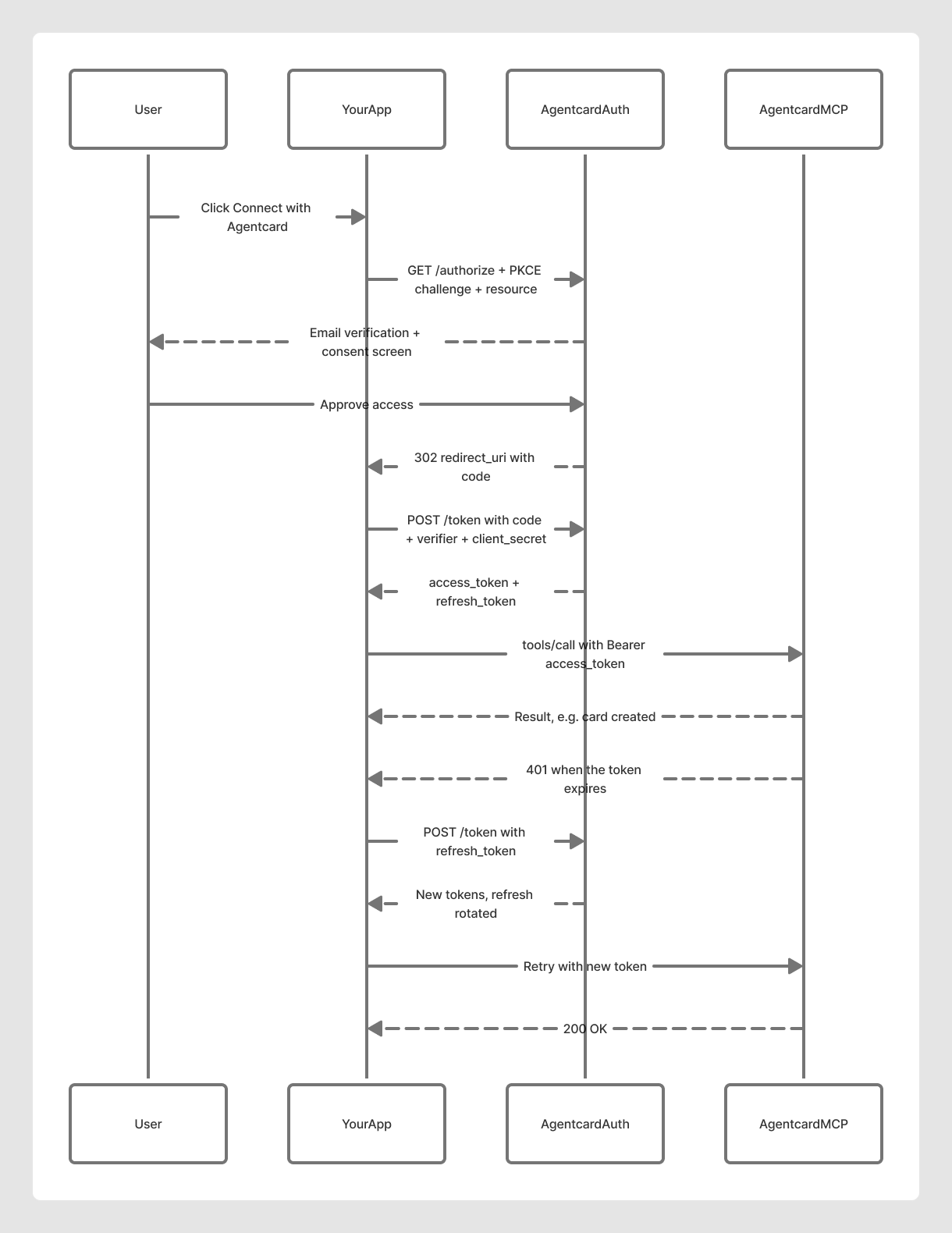 1. The user clicks **Connect with Agentcard** in your app.
2. Your app generates a PKCE `code_verifier`, derives its `code_challenge`, and redirects the user to `/authorize`.
3. Agentcard verifies the user by [email](/companies/authentication/email) and shows the consent screen with your app's name.
4. The user approves; Agentcard redirects back to your `redirect_uri` with an authorization `code`.
5. Your app exchanges the code (plus the `code_verifier` and your `client_secret`) at `/token` for an `access_token` and `refresh_token`.
6. Your app calls the MCP server with `Authorization: Bearer `.
7. When the token expires, a call returns `401` — refresh once at `/token` and retry. Each refresh **rotates** the refresh token.
## The requests
**Authorize** — redirect the user to:
```
https://mcp.agentcard.sh/authorize
?response_type=code
&client_id=
&redirect_uri=
&code_challenge=
&code_challenge_method=S256
&resource=https://mcp.agentcard.sh/mcp
&state=
```
**Exchange the code** on your callback:
```bash theme={null}
curl -X POST https://mcp.agentcard.sh/token \
-H 'Content-Type: application/x-www-form-urlencoded' \
-d grant_type=authorization_code \
-d code=
1. The user clicks **Connect with Agentcard** in your app.
2. Your app generates a PKCE `code_verifier`, derives its `code_challenge`, and redirects the user to `/authorize`.
3. Agentcard verifies the user by [email](/companies/authentication/email) and shows the consent screen with your app's name.
4. The user approves; Agentcard redirects back to your `redirect_uri` with an authorization `code`.
5. Your app exchanges the code (plus the `code_verifier` and your `client_secret`) at `/token` for an `access_token` and `refresh_token`.
6. Your app calls the MCP server with `Authorization: Bearer `.
7. When the token expires, a call returns `401` — refresh once at `/token` and retry. Each refresh **rotates** the refresh token.
## The requests
**Authorize** — redirect the user to:
```
https://mcp.agentcard.sh/authorize
?response_type=code
&client_id=
&redirect_uri=
&code_challenge=
&code_challenge_method=S256
&resource=https://mcp.agentcard.sh/mcp
&state=
```
**Exchange the code** on your callback:
```bash theme={null}
curl -X POST https://mcp.agentcard.sh/token \
-H 'Content-Type: application/x-www-form-urlencoded' \
-d grant_type=authorization_code \
-d code= \
-d redirect_uri= \
-d client_id= \
-d client_secret= \
-d code_verifier= \
-d resource=https://mcp.agentcard.sh/mcp
```
Response: `{ access_token, refresh_token, expires_in, token_type }`. Store both tokens encrypted, keyed to the user.
**Refresh** when a call returns `401`:
```bash theme={null}
curl -X POST https://mcp.agentcard.sh/token \
-H 'Content-Type: application/x-www-form-urlencoded' \
-d grant_type=refresh_token \
-d refresh_token= \
-d client_id= \
-d client_secret= \
-d resource=https://mcp.agentcard.sh/mcp
```
Public (PKCE-only) clients omit `client_secret` on both requests; confidential clients must send it on both.
## Tokens
| | |
| -------------------- | --------------------------------------------------------------------- |
| **Access token** | Read `expires_in` from the response — don't hardcode a lifetime |
| **Refresh token** | Long-lived; **rotates on every refresh** — always persist the new one |
| **Refresh strategy** | Lazy — refresh on `401`, then retry. No polling needed |
| **Revocation** | The user disconnecting your app invalidates both tokens immediately |
## Keep it safe
* **PKCE is always enforced** — for confidential clients too. The `code_verifier` proves the token request comes from whoever started the flow.
* **Always send `resource=https://mcp.agentcard.sh/mcp`** on both `/authorize` and `/token` — tokens are bound to that audience and validated on every call.
* **Bind `state` to the initiating user** and verify it on the callback to prevent CSRF.
* **Keep secrets server-side.** Never expose `client_secret` or tokens to the browser, and never log them.
Using a spec-compliant MCP client (like the Vercel AI SDK's)? Point it at Agentcard and it handles discovery, PKCE, the `resource` parameter, storage, and refresh-on-401 for you.
## Discovery
Everything above is discoverable at runtime — endpoints can be confirmed programmatically:
```bash theme={null}
curl https://mcp.agentcard.sh/.well-known/oauth-authorization-server
curl https://mcp.agentcard.sh/.well-known/oauth-protected-resource
```
Users stay in control: `agent-cards connections` lists the apps they've connected, and `connections revoke ` disconnects one instantly.