> ## Documentation Index
> Fetch the complete documentation index at: https://docs.agentcard.sh/llms.txt
> Use this file to discover all available pages before exploring further.
# Email
> Completing the OAuth flow with an email magic link
Email is how users verify themselves inside the [OAuth flow](/companies/authentication/oauth). It's fully hosted by Agentcard — your app starts the flow and handles the callback, nothing more.
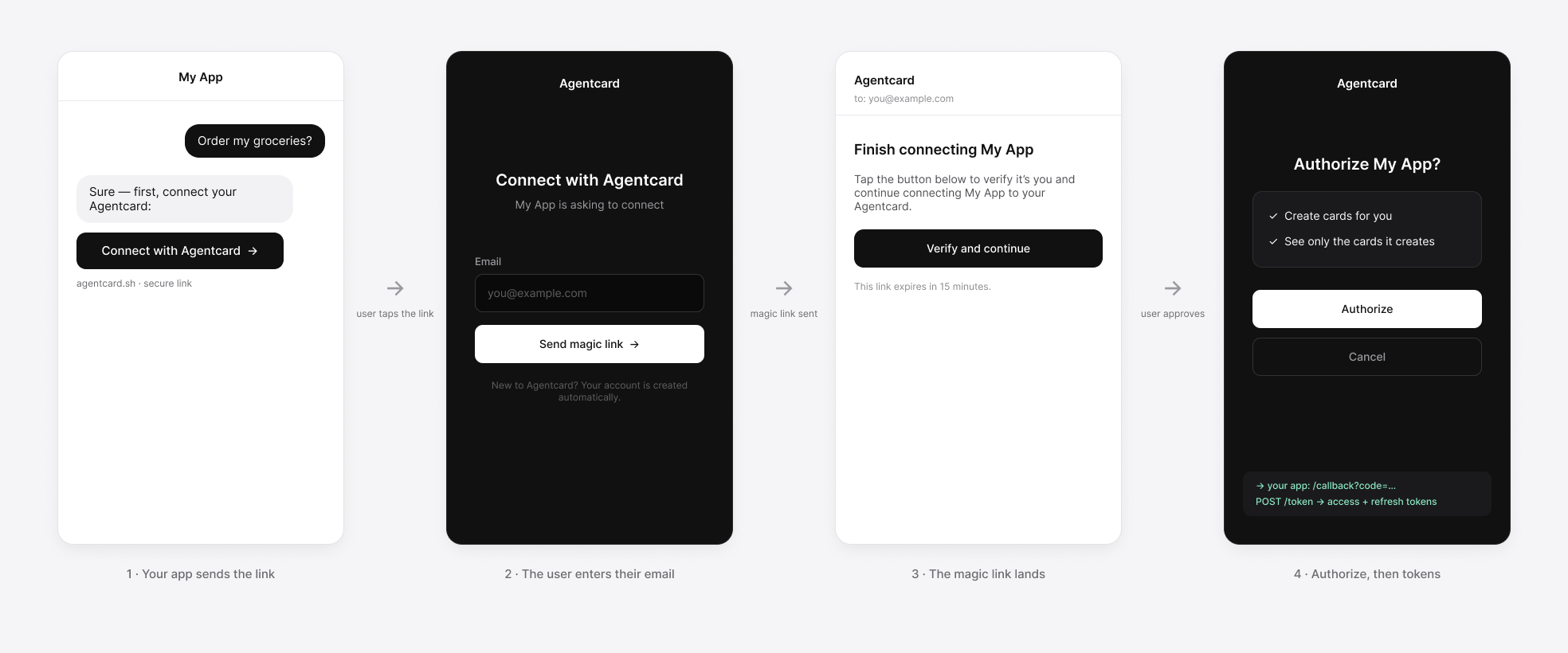 From left to right: your app sends the user an authentication link → Agentcard's hosted screen asks for their email → they open the magic link in their inbox → they authorize, and your app exchanges the code for tokens.
## How it goes
1. Your app redirects the user to `/authorize`. Agentcard shows the hosted screen with your app's name and an email field.
2. The user enters their email and gets a **magic link**, valid for **15 minutes**. The screen tells them to check their inbox.
3. They click the link and land on the consent screen — in whichever tab or browser the link opens.
4. They hit **Authorize**, and Agentcard redirects that tab to your `redirect_uri` with the authorization `code`. From here it's the normal [token exchange](/companies/authentication/oauth#the-requests).
## Good to know
* **New users are created on the spot.** Entering an email that has no Agentcard account yet creates one — users don't need to sign up before connecting to your app.
* **The callback can arrive from a different tab** than the one that started the flow (the magic link opens wherever the user's email client is). Keep your PKCE `code_verifier` and `state` recoverable server-side rather than in tab-local state.
* **Expired link?** The user just restarts from your Connect button — a fresh redirect to `/authorize` sends a fresh link.
* **Consent is explicit.** The authorization code is only minted after the user clicks Authorize on the consent screen — verifying the email alone grants nothing.
From left to right: your app sends the user an authentication link → Agentcard's hosted screen asks for their email → they open the magic link in their inbox → they authorize, and your app exchanges the code for tokens.
## How it goes
1. Your app redirects the user to `/authorize`. Agentcard shows the hosted screen with your app's name and an email field.
2. The user enters their email and gets a **magic link**, valid for **15 minutes**. The screen tells them to check their inbox.
3. They click the link and land on the consent screen — in whichever tab or browser the link opens.
4. They hit **Authorize**, and Agentcard redirects that tab to your `redirect_uri` with the authorization `code`. From here it's the normal [token exchange](/companies/authentication/oauth#the-requests).
## Good to know
* **New users are created on the spot.** Entering an email that has no Agentcard account yet creates one — users don't need to sign up before connecting to your app.
* **The callback can arrive from a different tab** than the one that started the flow (the magic link opens wherever the user's email client is). Keep your PKCE `code_verifier` and `state` recoverable server-side rather than in tab-local state.
* **Expired link?** The user just restarts from your Connect button — a fresh redirect to `/authorize` sends a fresh link.
* **Consent is explicit.** The authorization code is only minted after the user clicks Authorize on the consent screen — verifying the email alone grants nothing.